ConnectBooster payments FAQ
How do I find out who my processors are?
The easiest way to determine who your processors are (both ACH/EFT/Direct Debit and credit card) would be to refer to the line items listed on your ConnectBooster quote.
- Credit card processors (US): Xplor Pay (formerly Clearent), EPX, Nuvei, BlueSnap
- ACH processors (US): Paya, Payliance, Nuvei, BlueSnap, Straddle (formerly ACHQ)
- Credit card processors (CA): Nuvei, Global Payments East, BlueSnap
- EFT Processors (CA): Worldline (formerly Bambora), BlueSnap
- Credit card processors (AU/NZ): Worldpay (formerly Payrix)
- Direct Debit (AU/AZ): Worldpay (formerly Payrix)
- Credit card processors (Europe): BlueSnap
- Direct Debit (Europe): BlueSnap
Alternative processors can be addressed with your Account Manage
Understanding your credit card pricing model
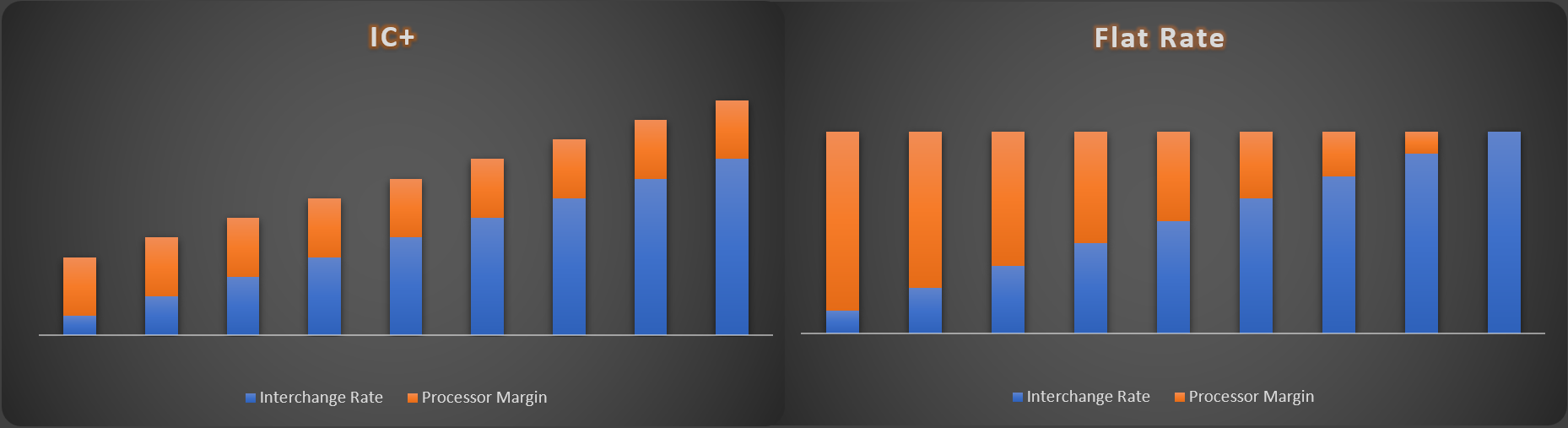
| IC+: Transparent, breaks down interchange fees and adds a separate markup. |
Flat Rate: Easy to understand and predict costs. |
||
|---|---|---|---|
| Pros | Cons | Pros | Cons |
| Clear understanding of costs and markups. |
More complex and difficult to understand. |
Easy to understand and predict costs. |
Lack of transparency, hidden interchange fees and other costs. |
| Cost-efficient for high-value transactions. |
Not as straightforward as flat rate pricing. |
Cost-effective for small transactions. |
Can be less favorable for high-value transactions. |
| Customizable to suit different business needs. |
|
Suitable for businesses with simple transaction patterns. |
|
Understanding how your monthly CB SaaS is calculated
ConnectBooster monthly SaaS is calculated based on the monthly volume ran through the ConnectBooster portal at a $149 base or 0.5% (whichever is greater) of the monthly volume. If you run $100,000 through the portal in a given month, your monthly SaaS will be calculated as such:
Monthly SaaS: $100,000 x 0.005 = $500
Why do I need to complete PCI compliance?
PCI compliance is required by your processor, Xplor Pay / EPX / Nuvei / BlueSnap. You will find some additional information below regarding PCI compliance and its importance.
“PCI Compliance is compliance with the Payment Card Industry Data Security Standards, mandated by the card brands Visa, MC, Discover and Amex. It is a requirement for any merchant in the country who runs sales using credit cards."
As a merchant of Xplor Pay / EPX / Nuvei / BlueSnap you are asked to complete the PCI compliance as you are processing credit cards. The completion of your PCI compliance also ensures that you will not incur a monthly non-compliance fee.
Your PCI compliance does need to be submitted annually so, it is recommended to create a yearly calendar reminder to ensure it remains up to date and you do not incur these additional monthly non-compliance fees. Should you have any questions regarding where/how to complete this form, please reach out to our support team at payments@connectbooster.com for assistance.
What are my processing limits in regard to ACH/EFT?
There can be a few possible limits set for ACH accounts, a monthly transaction limit, a daily transaction limit and/or a single transaction limit.
- Monthly Volume: With most processors, transactions attempted once the monthly processing limit has been reached will decline. If that is the case, you will need to wait for the limit period to reset on the first of each month in order to resume processing.
- Weekly Limit: Specific to Paya – limits are in a 6-day rolling period per bank account. This limit will reset after the 6-day period.
- Daily Limits: With most processors, transactions attempted once the daily processing limit has been reached will decline. If that is the case, you will need to wait until the next day in order to resume processing.
- Single Transaction: With most processors, ACH transactions over the single transaction limit will be declined.
My clients are not able to pay me, what do I need to do?
Don’t be afraid to apply for an amendment to your existing processing limits. If you are a merchant with an account that is in good standing, for at least 60-90 days, and free of chargebacks, our team would be happy to reach out to your processor to request a limit increase. You can reach out to our team at payments@connectbooster.com to get that process started.
IMPORTANT Additional documentation may be requested by processors to process this request.
What is the typical funding time for ACH payments?
Automated Clearing House (ACH) transactions are electronic fund transfers that facilitate the movement of funds between bank accounts. These transactions can take multiple days to fund to your bank account for several reasons.
- ACH processing time: The ACH network operates on a batch processing system, which means that transactions are collected and processed in batches at specific times throughout the day. The processing time for ACH transactions can take up to two business days, and this is the primary reason for the delay in funds reaching your account.
- Weekends and holidays: The ACH network does not operate on weekends or federal holidays. Therefore, any transactions processed on a Friday may not be credited to your account until the following Tuesday or Wednesday, depending on the holiday schedule.
- Bank processing time: Once the ACH transaction has been processed, your bank will need to complete additional processing before the funds are credited to your account. This process can take a day or two, depending on the bank's policies and procedures.
- Security checks: Banks have security measures in place to prevent fraudulent activities such as identity theft and money laundering. When a large sum of money is transferred through the ACH network, the bank may hold the funds for additional security checks to ensure that the transaction is legitimate. This may cause a delay in the funds reaching your account.
- Cut-off times: Banks have specific cut-off times for ACH transactions, and any transactions initiated after the cut-off time may not be processed until the following business day. This can add to the delay in funds reaching your account.
How can I decrease my ACH funding time?
Provided you are in good standing for at least 90 days with your ACH processor and your account is free of chargebacks, you can submit an ACH Funding Time Decrease to our team at payments@connectbooster.com and they can begin communications with your processor.
What are my processing limits in regard to CC?
In most cases, credit card transactions will continue to be successful after processing limits have been reached. This does not mean you should ignore your processing limits. When you exceed your limits on a single transaction or go over your monthly processing limits, your credit card processor may perceive a risk.
For example, if your normal average ticket is smaller like a $1500 monthly service agreement, but then a client has you do a large $75,000 hardware order, a sudden boost in your sales one month of the year may seem unusual to the processor. As the merchant, you know you are merely experiencing a higher sales volume due to a business client’s need. But to the processor, this activity may seem abnormal and at higher risk for chargebacks. In some situations, like this, you may experience an account reserve or held funds. For most businesses this is not a pleasant experience. After all, you are in business to make money, and if you can’t access your capital, how will you purchase inventory, pay for overhead, market your business, and turn a profit? But unfortunately, that is exactly what could happen. What’s worse is that there is no way of knowing how long your money will be held. It could be days…weeks…or even months.
What is the typical funding time for CC payments?
How quickly your transactions begin the funding cycle, and how quickly they move through that cycle, depends on the following three factors:
- Credit Card Type: Visa, MasterCard and Discover transactions follow the standard funding for credit card transactions, detailed above. Most American Express transactions also fund on this timeline. Depending on the setup of your Amex account, some organizations will receive these transactions after one additional business day.
- Credit Card Batch Closing Times: Batches are Settled Monday – Friday, the batch settlement time may vary based on the processor and the funding speed selected.
- Your Bank's Policy for Posting Funds to Your Account: Each bank has a policy for when it makes funds available to its organizations. Often, a deposit from your credit card processor is not posted to your account until the business day after it is received.
Why did my credit card processor put a hold on my funds? And how do I get it removed?
Your account is brand new, and the processor is finalizing the underwriting process by verifying your first few processed transactions.
- A transaction you’ve processed seems unusual or outside of normal volumes.
- For example, if you typically process $100 transactions, but today you charged an organization $1000, the processor will likely flag the transaction and request information to ensure it wasn’t fraudulent or accidental.
- Uncommon account activity such as an unusually high amount of declined transactions, a large number of refunds, or multiple charges on the same card in a short period of time
- A high number of chargebacks
- Processors typically look for a chargeback ratio of under 1% of total transactions (in number or dollar amount). If your chargeback ratio begins to exceed this, your account may be flagged.
Typical documents requested by the processor in the event of your account being placed on a hold:
- Proof of authorization, like a signed contract
- Copy of the invoice for that transaction
- Your business bank statements
- Detailed business description
If you plan to process a transaction that falls into one of these categories, you can proactively reach out to our ConnectBooster Organization Care team (payments@connectbooster.com) with these documents to help mitigate the chances of your account being placed on hold.


